Embedding Content
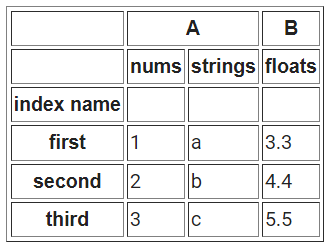
Red Mail allows to embed images and tables to the HTML bodies of emails. By default, tables often look outdated and ugly in emails but Red Mail has pre-made table templates that render nicer looking tables from Pandas dataframes.
Embedded Images
You can also embed images straight to the HTML body of the email:
email.send(
    subject='An image',
    receivers=['first.last@example.com'],
    html="""<h1>This is an image:</h1>
            {{ my_image }}
    """,
    body_images={
        'my_image': 'path/to/image.png',
    }
)
The outcome looks like this:

The image will be rendered as <img src="cid:...">.
In case you need to control the image (like the size)
you can also create the img tag yourself:
email.send(
    subject='An image',
    receivers=['first.last@example.com'],
    html='<h1>This is an image:</h1> <img src="{{ my_image.src }}" width=500 height=350>',
    body_images={
        'my_image': 'path/to/image.png',
    }
)
In addition to paths as strings, the following are supported:
pathlib.Pathbytes(the image as raw bytes)matplotlib.pyplot.FigurePIL.Image
Embedding Figure
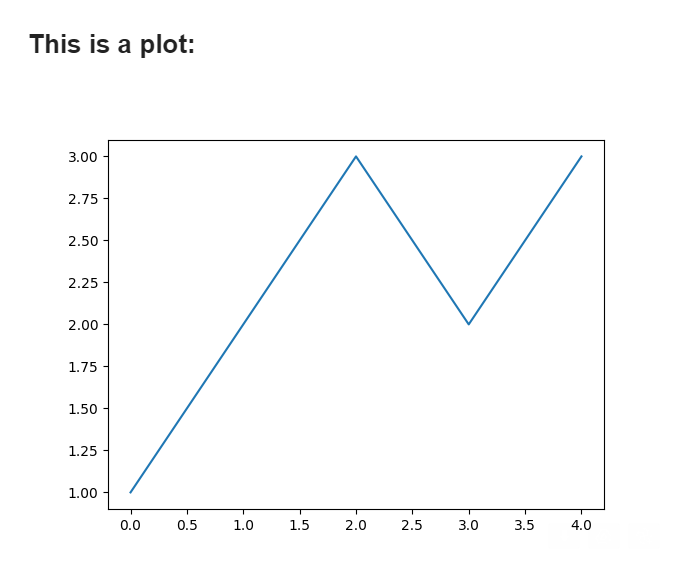
As mentioned, you may also include Matplotlib figures directly to the email. This is especially handy if you are creating automatic statistics.
A simple example to include a figure:
# Create a simple plot
import matplotlib.pyplot as plt
fig = plt.figure()
plt.plot([1,2,3,2,3])

# Send the plot
email.send(
    subject='A plot',
    receivers=['first.last@example.com'],
    html="""<h1>This is a plot:</h1>
            {{ my_plot }}
    """,
    body_images={
        'my_plot': fig,
    }
)
The outcome looks like this:
Embedded Tables
You may include tables simply by turning them
to raw HTML for example using df.to_html()
in Pandas. However, this often lead to very
ugly tables as SMTP is poor at handling CSS
or styling in general. Here is a comparison
of using df.to_html() directly vs embedding
via Red Mail:
 vs
vs 
To embed tables, you can simply pass them to the send function as Pandas dataframes:
# Creating a simple dataframe
import pandas as pd
df = pd.DataFrame({
    'nums': [1,2,3],
    'strings': ['yes', 'no', 'yes'],
})

# Let Red Mail to render the dataframe for you:
email.send(
    subject='A prettified table',
    receivers=['first.last@example.com'],
    html="<h1>This is a table:</h1> {{ mytable }}",
    body_tables={
        'mytable': df,
    }
)
Red Mail uses Jinja and inline HTML styling to make the tables look nice. Email servers typically don’t handle well CSS.
Warning
Red Email Pandas templating should work on various dataframe strucutres (empty, multi-indexed etc.) but sometimes the rendering may be off if the dataframe is especially complex in structural sense. There are plans to make it even more better.
You may also override the template paths (see Using Templates) to create custom templates if you wish to make your own table prettifying:
email.set_template_paths(
    html_table="path/to/templates",
    text_template="path/to/templates"
)
email.default_html_theme = "my_table_template.html"
email.default_text_theme = "my_table_template.txt"
The templates get parameter df which is the dataframe
to be prettified.